Export live data to Excel
How could I export live data to Excel from MetaTrade? I would like to export Open, High, low and Close, also Vol and time to a excel worksheet.
- How Stream MT4 Data into Excel per candle wise?
- Problem with DDE?
- Open high low close of the day
You use the DDE that comes with MT4
Place these codes in individual excel cells
=MT4|BID!EURUSD
=MT4|ASK!EURUSD
=MT4|HIGH!EURUSD
=MT4|LOW!EURUSD
=MT4|TIME!EURUSD
Change the symbol for different crosses.
You will also need to go to Tools / Options and tick the enable DDE box
Place these codes in individual excel cells
=MT4|BID!EURUSD
=MT4|ASK!EURUSD
=MT4|HIGH!EURUSD
=MT4|LOW!EURUSD
=MT4|TIME!EURUSD
Change the symbol for different crosses.
You will also need to go to Tools / Options and tick the enable DDE box
Yes, I know that much, I mean live data that fills into cells in the excel worksheet at specified user intervals. Also the Open and Close data.
You see I need this in order to use this data in a Neural Network
You see I need this in order to use this data in a Neural Network
You use the DDE that comes with MT4
Place these codes in individual excel cells
=MT4|BID!EURUSD
=MT4|ASK!EURUSD
=MT4|HIGH!EURUSD
=MT4|LOW!EURUSD
=MT4|TIME!EURUSD
Change the symbol for different crosses.
You will also need to go to Tools / Options and tick the enable DDE box
Place these codes in individual excel cells
=MT4|BID!EURUSD
=MT4|ASK!EURUSD
=MT4|HIGH!EURUSD
=MT4|LOW!EURUSD
=MT4|TIME!EURUSD
Change the symbol for different crosses.
You will also need to go to Tools / Options and tick the enable DDE box
When you say ""You use the DDE that comes with MT4", which file is that. The DDE-Sample.xls?
Do you create one file for each pair?
What do you name them?
Thanks
What I want is to be able to have a dynamic excel worksheet, that is one that grows with the data beeing feed by
MT4.
By the answers Im getting it seems that may be Im not making myself very clear..
I want to start the day with an empty excel sheet, as the minutes tick by, I want the values for the Day, Time, Open, High, Low, Close and Volume to appear in each row of my excel worksheet.
Is this possible?, and if not can it be incorporated in future updates?
Basically, because there are a few excel add ins that have Neural Network capabilities that can be used nicely for
system development.
thanks
MT4.
By the answers Im getting it seems that may be Im not making myself very clear..
I want to start the day with an empty excel sheet, as the minutes tick by, I want the values for the Day, Time, Open, High, Low, Close and Volume to appear in each row of my excel worksheet.
Is this possible?, and if not can it be incorporated in future updates?
Basically, because there are a few excel add ins that have Neural Network capabilities that can be used nicely for
system development.
thanks
ted 16.03.05 03:52
You just need to tick the box mentioned and the dde will run automatically when you are logged onto mt4.
This is a link to an excel workbook that I have set up that uses the mt4 dde..
Make sure you are logged into MT4 and the dde is enabled before you open the workbook.
http://www.stideas.com/download_indicator_zip_file.htm
You just need to tick the box mentioned and the dde will run automatically when you are logged onto mt4.
This is a link to an excel workbook that I have set up that uses the mt4 dde..
Make sure you are logged into MT4 and the dde is enabled before you open the workbook.
http://www.stideas.com/download_indicator_zip_file.htm
Thank you very much, it lookg good let me play around and Ill get back to you
you can open the dde-sample of MT4 in the visual basic editor. all the calls are in there.
Hi,
i cannot download the file, but I'd like to do the same so I need a huge amount of data of Day, Time, Open, High, Low, Close and Volume
mpfx :
You use the DDE that comes with MT4
Place these codes in individual excel cells
=MT4|BID!EURUSD
=MT4|ASK!EURUSD
=MT4|HIGH!EURUSD
=MT4|LOW!EURUSD
=MT4|TIME!EURUSD
Change the symbol for different crosses.
You will also need to go to Tools / Options and tick the enable DDE box
You use the DDE that comes with MT4
Place these codes in individual excel cells
=MT4|BID!EURUSD
=MT4|ASK!EURUSD
=MT4|HIGH!EURUSD
=MT4|LOW!EURUSD
=MT4|TIME!EURUSD
Change the symbol for different crosses.
You will also need to go to Tools / Options and tick the enable DDE box
hello,
I wanted to export excel sheet on the symbols of the future on my MT4, es for oil symbol is: =MT4|BID!# CLH9 but excel does not accept the symbol #
I wanted to export excel sheet on the symbols of the future on my MT4, es for oil symbol is: =MT4|BID!# CLH9 but excel does not accept the symbol #
What should I do?
there is an alternative solution?
thanks
thanks
hi,
i get error after i type in =MT4|BID!EURUSD 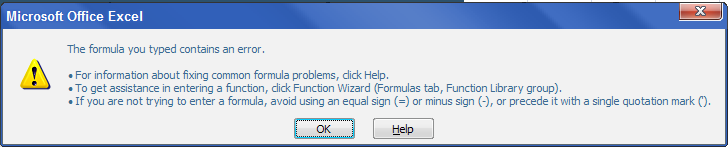
Anyone knows what's the problem?

You are missing trading opportunities:
- Free trading apps
- Over 8,000 signals for copying
- Economic news for exploring financial markets
Registration
Log in
You agree to website policy and terms of use
If you do not have an account, please register